
Restaurant POS System in Kenya
Busy lunch hours, mixed M-Pesa and cash payments, and stock that disappears without a record make running a restaurant hard. Isoftke’s restaurant POS system in Kenya helps restaurants, cafés and takeaways take orders fast, record every payment and close each shift knowing exactly where the money and stock went.
Our restaurant POS is built by our team in Nairobi for how Kenyan food businesses actually work. See it in our portfolio.
Why your restaurant needs a POS system
Paper order books and a cash box can’t tell you which dishes sell best, which shift came up short, or why your soda stock is always lower than expected. A restaurant POS system records every order, payment and stock movement as it happens, so you make decisions on facts instead of guesses.
Features of our restaurant POS software in Kenya
Menu and prices
Set up your menu with photos and prices, and mark dishes as special offers. Update prices once and the till updates instantly.
Fast order taking
Tap dishes to build an order, choose takeaway or a table, and add the customer’s name and notes such as “no onion”, so the kitchen gets it right.
M-Pesa and cash payments
Record each order as M-Pesa or cash. The shift report shows the split, so you know exactly how much should be in the drawer and in M-Pesa.
Shifts and cash drawer control
Every cashier works in a shift. The system tracks opening cash, cash sales and cash taken out, calculates the expected drawer balance, and flags any shortage.
Stock and running-low alerts
Stock reduces with every sale and the till warns you when items are running low, before you run out in the middle of service.
Stock audit trail
See every item sold or written off, by whom, in which shift and at which branch, so losses are easy to trace.
Shift and sales reports
Total sales, orders paid, VAT collected and top-selling items for every shift, ready when you close.
Online menu, QR code and reviews
Your restaurant gets a public page with your menu, a QR code and link to share, and customer reviews that help new diners find you.
Multiple branches
Run more than one outlet? Sales, shifts and stock are kept per branch.
Who it’s for
- Restaurants: dine-in and takeaway orders with clean shift reports.
- Cafés and coffee shops: quick orders with M-Pesa at the counter.
- Fast food and takeaways: speed at peak hours and accurate cash-ups.
- Hotel restaurants and food courts: several outlets, one view of sales and stock.
Need a POS for a shop or other business? See our POS system in Kenya.
How it works
How a shift works with our restaurant POS
Open the shift
The cashier starts a shift and records the opening cash in the drawer.
Take orders
Tap dishes from your menu, choose takeaway or a table, and add names and notes.
Get paid
Record each order as M-Pesa or cash. Stock updates automatically with every sale.
Close and reconcile
Close the shift to see sales, VAT, top items and whether the drawer is short or over.
Real screenshots
See our restaurant POS system in action
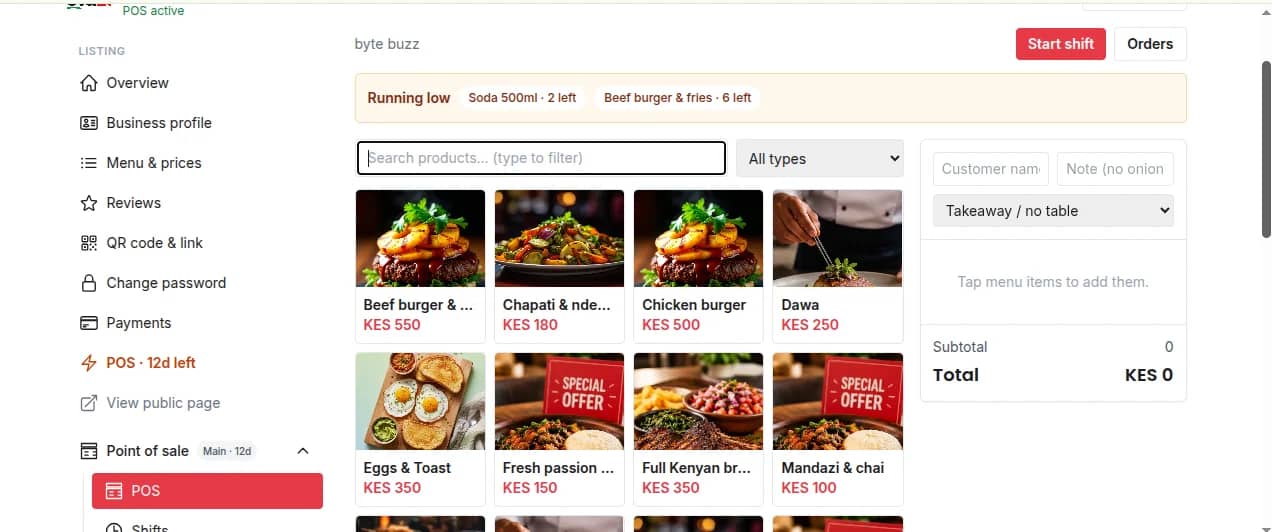
Restaurant POS till: tap dishes from your menu, choose takeaway or a table, and add order notes 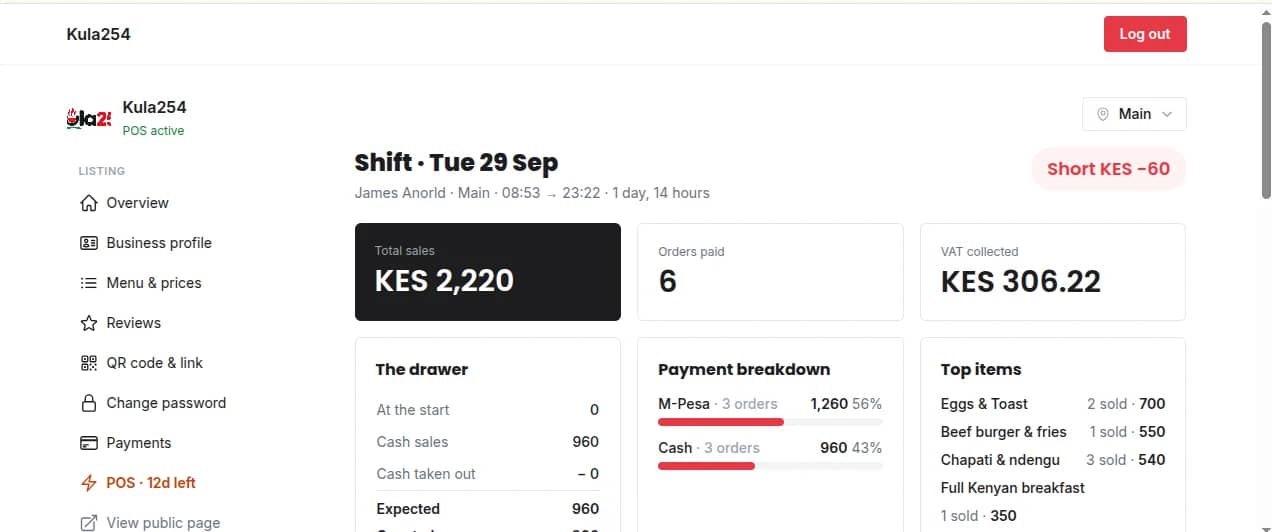
Shift report: sales, orders paid, VAT collected, M-Pesa vs cash and the cash drawer balance 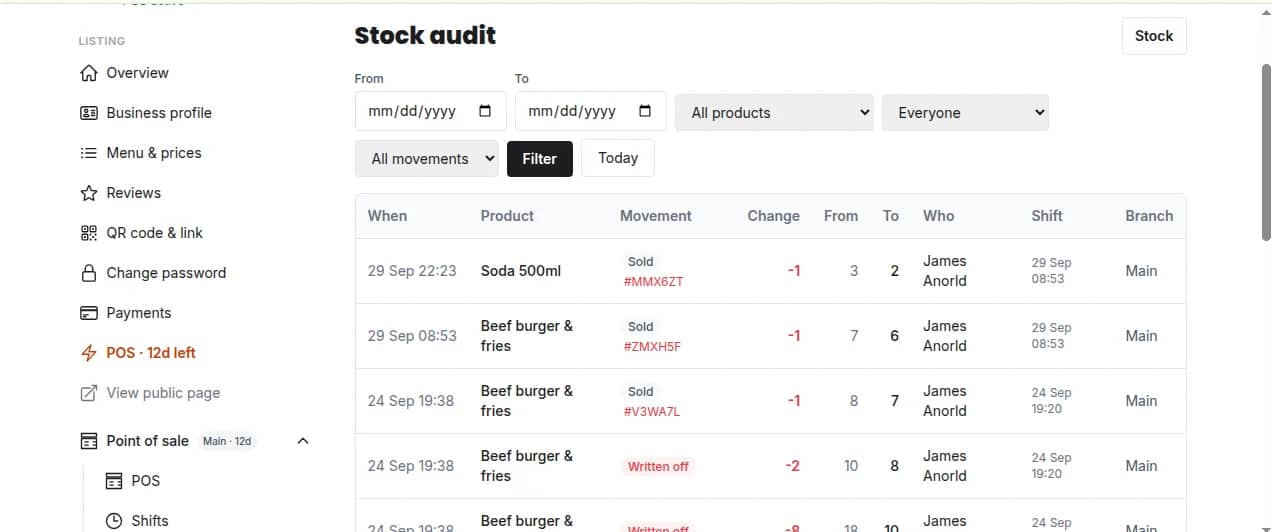
Stock audit: every item sold or written off, by cashier, shift and branch
FAQ
Restaurant POS system FAQs
The best restaurant POS system in Kenya takes M-Pesa, works with your menu, handles takeaway and table orders, and closes every shift with a clear cash and stock report. Our restaurant POS software does all of this, and you can see it working before you decide.
Yes. Every order is paid as M-Pesa or cash, and each shift report shows exactly how much came in through each, so cash-ups are quick and accurate.
Yes. Choose takeaway or a table for each order, add the customer’s name and notes such as “no onion”, and keep track of open orders.
Each cashier opens a shift. The system records cash sales and cash taken out, calculates what should be in the drawer, and flags any shortage or excess when the shift closes.
Yes. Stock reduces with every sale, items that are running low are highlighted on the till, and the stock audit lists every sale and write-off by item, cashier and shift.
Yes. Sales, shifts and stock are recorded per branch, so you can manage several outlets from one account.
Yes. Your restaurant gets a public page with your menu and prices, a shareable link and a QR code, plus customer reviews.
Get a demo for your restaurant
Looking for something else?
Read our latest articles